The Complete Guide to Linux: The Engine of the Modern World
In the vast, interconnected landscape of 21st-century computing, one name stands as the silent titan. It powers the smartphone in your pocket, the high-speed smart television in your living room, the flight controllers in the sky, and 100% of the world’s most powerful supercomputers. That name is Linux.
While many casual users are only familiar with the consumer-facing interfaces of Windows or macOS, Linux is the foundational bedrock of the internet, cloud computing, and modern enterprise technology. It is the invisible force that keeps the modern world spinning. This comprehensive guide explores the depths of the Linux ecosystem and why it remains the most vital software project on the planet.
1. The Birth of a Revolution: From a Hobby to Global Dominance
To understand the power of Linux, we must look back to 1991. A Finnish student named Linus Torvalds was frustrated with the limitations of Minix, a small Unix-like system. He posted a now-famous message on a newsgroup, stating he was working on a free operating system as “just a hobby, won’t be big and professional like GNU.”
Fast forward three decades, and that “hobby” has become the largest collaborative project in human history. Linux succeeded because it arrived at the perfect time—the dawn of the internet. It provided a free, stable alternative to expensive proprietary Unix systems, allowing startups and hobbyists to build the web without paying exorbitant licensing fees. Today, millions of developers contribute to its codebase, ensuring it stays ahead of the curve.
2. What is Linux, Really?
At its core, Linux is an operating system (OS). An OS is the primary software that manages all hardware resources associated with your computer. It acts as the translator between the hardware (the physical silicon and wires) and the software (the applications you run).
The Anatomy of a Linux System
Linux is modular, meaning it is built from several layers that can be swapped or modified:
- The Bootloader: When you hit the power button, the bootloader (often GRUB) manages the transition from hardware initialization to the OS.
- The Kernel: This is the “brain.” It manages the CPU, memory, and peripheral devices. It is the lowest level of software that interfaces with hardware.
- Init System: This is the first process that starts after the kernel boots. It manages all other services (daemons). systemd is the modern standard.
- Daemons: These are the invisible workers. They handle background tasks like printing, network connectivity, and time synchronization.
- The Shell: This is the command-line interface (CLI). While it looks intimidating to beginners, it is the most efficient way to communicate with a computer.
- Desktop Environment (DE): This is the graphical layer. Unlike Windows, which has one look, Linux offers many. You can choose GNOME for a modern feel or XFCE for speed.
3. The Incredible Power of Open Source
What truly sets Linux apart is that it is Open Source. In proprietary software (like Windows), the “source code” is a closely guarded secret.
Linux is governed by the GNU General Public License (GPL). This transparency creates a virtuous cycle of security. When a vulnerability is found, thousands of developers worldwide can see it and patch it immediately. In the proprietary world, you must wait for a corporation to acknowledge the bug and release a fix on their own timeline. This collaborative nature is why Linux evolves at a pace that massive companies rarely match.
4. Stability That Borders on the Supernatural
Linux is legendary for its “uptime.” In the Windows world, we are accustomed to the “Patch Tuesday” reboot or the occasional system crash. In contrast, Linux servers in data centers often run for 5 to 10 years without a single reboot.
This is because Linux is modular. You can update almost any part of the system—even the kernel itself using “Livepatch” technology—without stopping the machine. This reliability is why the New York Stock Exchange and the Tokyo Stock Exchange run on Linux. When billions of dollars are at stake, you don’t trust a system that might decide to update and reboot in the middle of a trading session.
5. Security: A Fortress Built by Transparency
Is Linux virus-proof? No. But its architecture makes it significantly more secure than its competitors.
- Permissions: In Linux, users do not have “Root” (administrative) privileges by default. To install a program or change a system setting, you must explicitly use a command like
sudo. - No Backdoors: Because the code is public, it is nearly impossible for a government or corporation to hide a “backdoor” to spy on users without someone in the community noticing.
- Repository Model: Instead of downloading
.exefiles from random websites, Linux users use “Package Managers.” This is like an App Store where software is vetted by community maintainers.
6. Total Flexibility: From Toasters to Mars
One of the most incredible aspects of Linux is its scalability.
- The Small: Linux can be stripped down to a few megabytes to run on a smart lightbulb or a Raspberry Pi.
- The Large: It can be scaled up to manage the 500 fastest supercomputers on Earth.
- The Extreme: When NASA sent the Perseverance Rover to Mars, they chose Linux to power the Ingenuity Helicopter. Linux is literally the first OS to achieve powered flight on another planet.
7. The Distro Ecosystem: A Version for Everyone
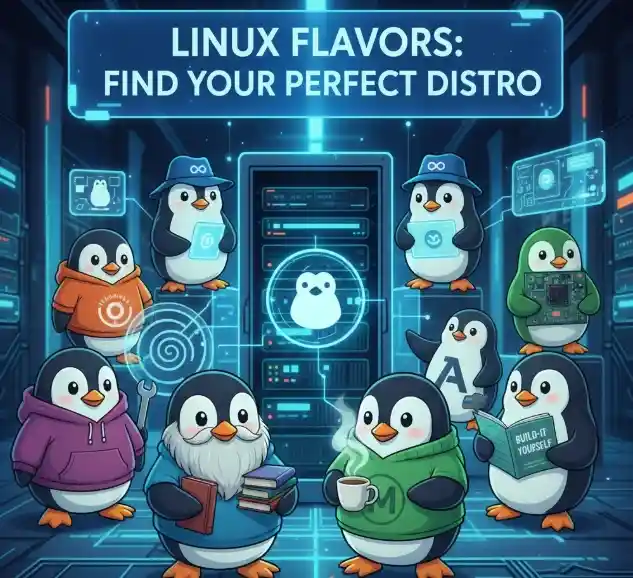
Because Linux is free to modify, hundreds of “Distributions” (or Distros) exist. Choosing a distro is like choosing a car: they all have engines, but they are built for different terrains.
| Distribution | Best For | Key Feature |
| Ubuntu | Beginners | User-friendly, massive community support. |
| Debian | Stability & Servers | Known as the “Universal OS,” extremely stable. |
| Redhat(Fedora) | Developers | Cutting-edge features; “bleeding edge” software. |
| Kali Linux | Cybersecurity | Pre-packed with tools for penetration testing. |
| Arch Linux | Advanced Users | A “do-it-yourself” distro built from scratch. |
8. Why Linux is the King of the Internet
Every time you open a browser, you are interacting with Linux.
- Web Servers: Over 70% of web servers run Linux. The “LAMP” stack (Linux, Apache, MySQL, PHP) is the classic foundation for web hosting.
- The Cloud: When you use “The Cloud” (AWS, Google Cloud, Azure), you are just using someone else’s Linux server. Even Microsoft Azure now hosts more Linux virtual machines than Windows ones.
- Mobile Technology: Android is built on top of the Linux kernel. If you have an Android phone, you are carrying a Linux machine in your pocket.
9. Breaking the Hardware Chains
Proprietary operating systems often have “planned obsolescence.” As Windows 11 or macOS evolves, they require newer, faster hardware, forcing perfectly good computers into landfills.
Linux is the ultimate “e-waste” fighter. Because it is so efficient with resources, a lightweight distribution like Lubuntu or Puppy Linux can turn a 12-year-old laptop into a snappy, functional machine for web browsing and office work. It breathes new life into hardware that the corporate world has abandoned.
10. Linux in the Professional World: DevOps and Beyond
In the professional world, Linux is the “lingua franca” of technology.
The Rise of DevOps
DevOps is the practice of combining software development and IT operations. Linux is the heart of this movement. Tools like Docker and Kubernetes allow developers to “containerize” applications—wrapping them in a small piece of a Linux environment so they run the same way on any machine, whether it’s a developer’s laptop or a massive cloud server.
The Power of the Command Line (CLI)
While Windows users rely on a Graphical User Interface (GUI), Linux power users use the Terminal. The command line allows for incredible automation through “shell scripting.” Tasks that would take hours to do manually in a GUI can be done in seconds with a single script. For example, a single command can search through thousands of text files, extract specific data, and format it into a report instantly.
Linux vs. Other Operating Systems: A Quick Comparison
How does Linux stack up against the competition?
- Linux vs. Windows: Windows is designed for ease of use and has the best support for AAA gaming and specialized creative suites (like Adobe). Linux is more secure, faster, and gives the user total control over their data and privacy.
- Linux vs. macOS: macOS is actually a distant cousin of Linux (both are Unix-like). However, macOS is a “walled garden”—it only runs on expensive Apple hardware. Linux can run on almost any device and is entirely open-source and free.
Getting Started: The “Live” Experience
One of the coolest things about Linux is that you can try it without even installing it. Most distributions offer a “Live USB” mode. You can plug a flash drive into your current computer, reboot, and run Linux directly from the drive. It won’t touch your hard drive or delete your files, allowing you to “test drive” the OS before committing.
The Learning Curve: Is It Worth It?
Is Linux hard to learn? It can be. Because it offers so much control, it expects the user to have a bit more curiosity. However, modern distributions like Linux Mint or Ubuntu are so polished that someone with zero technical skills can use them to browse the web, check email, and write documents without ever seeing a line of code.
For those who do choose to learn the “Linux way,” the rewards are immense. You gain a deeper understanding of how computers actually work, you gain highly marketable skills in the IT industry, and you gain the freedom to customize your digital life exactly how you want it.
Conclusion: The Future is Open
Linux is more than just an operating system; it is a philosophy of collaboration, transparency, and freedom. It has democratized technology, allowing anyone with a computer to access the same high-powered tools used by NASA, Google, and CERN.
As we move further into the eras of Artificial Intelligence, Edge Computing, and 5G, Linux will continue to be the foundation upon which the future is built. AI models are trained on Linux clusters, and the smart cities of tomorrow will be managed by Linux-based sensors.
The engine of the world is running on Linux—perhaps it’s time you took a look under the hood. Whether you are looking to start a career in IT, protect your digital privacy, or simply want a faster computer, Linux offers a world of possibilities that proprietary systems simply cannot match.